'/%3e%3cpath%20d='M20%200C31.0454%200.000263888%2039.9999%208.95455%2040%2020C39.9999%2030.962%2031.1805%2039.8647%2020.25%2039.999C20.2428%2039.9991%2020.2348%2039.999%2020.2275%2039.999V40C20.2173%2040%2020.2065%2039.9991%2020.1963%2039.999C20.1311%2039.9996%2020.0653%2040%2020%2040V39.9941C18.9137%2039.9663%2017.8401%2039.7415%2016.835%2039.3252C15.76%2038.8799%2014.7828%2038.227%2013.96%2037.4043C13.137%2036.5813%2012.4835%2035.6036%2012.0381%2034.5283C11.5928%2033.4531%2011.3633%2032.3005%2011.3633%2031.1367V21.1904L15%2023.29V31.1367C15%2031.823%2015.1358%2032.5026%2015.3984%2033.1367C15.6611%2033.7708%2016.0459%2034.3477%2016.5312%2034.833C17.0164%2035.3181%2017.5927%2035.7032%2018.2266%2035.9658C18.842%2036.2207%2019.5013%2036.3546%2020.167%2036.3623C20.1795%2036.3622%2020.1925%2036.3625%2020.2051%2036.3623C29.1474%2036.2525%2036.3632%2028.9687%2036.3633%2020C36.3632%2010.9629%2029.0371%203.63698%2020%203.63672C18.3456%203.63673%2016.7505%203.88277%2015.248%204.33789L11.2344%202.01953C11.3217%201.97623%2011.4102%201.93338%2011.499%201.8916C14.081%200.677617%2016.9642%201.31978e-05%2020%200Z'%20fill='url(%23paint1_linear_3622_27254)'/%3e%3ccircle%20cx='13.179'%20cy='17.2727'%20r='2.27273'%20fill='%237F6AA0'/%3e%3cdefs%3e%3clinearGradient%20id='paint0_linear_3622_27254'%20x1='32.2865'%20y1='6.36342'%20x2='-0.0294657'%20y2='36.0851'%20gradientUnits='userSpaceOnUse'%3e%3cstop%20offset='0.163105'%20stop-color='%23D76F70'/%3e%3cstop%20offset='1'%20stop-color='%237F6AA0'/%3e%3c/linearGradient%3e%3clinearGradient%20id='paint1_linear_3622_27254'%20x1='40'%20y1='0'%20x2='9.66985'%20y2='38.7763'%20gradientUnits='userSpaceOnUse'%3e%3cstop%20stop-color='%23DB6F6E'/%3e%3cstop%20offset='1'%20stop-color='%23F7BA29'/%3e%3c/linearGradient%3e%3c/defs%3e%3c/svg%3e)

Stop typing 'around 1:23'. Start drawing on the frame.
A complete system for managing video drafts, reviewing them with precision, and shepherding them to approval. Comments live where they belong: on the actual frame.
Nine launch capabilities. One shipped tool.
We didn't ship a roadmap. We shipped a complete review system on day one.
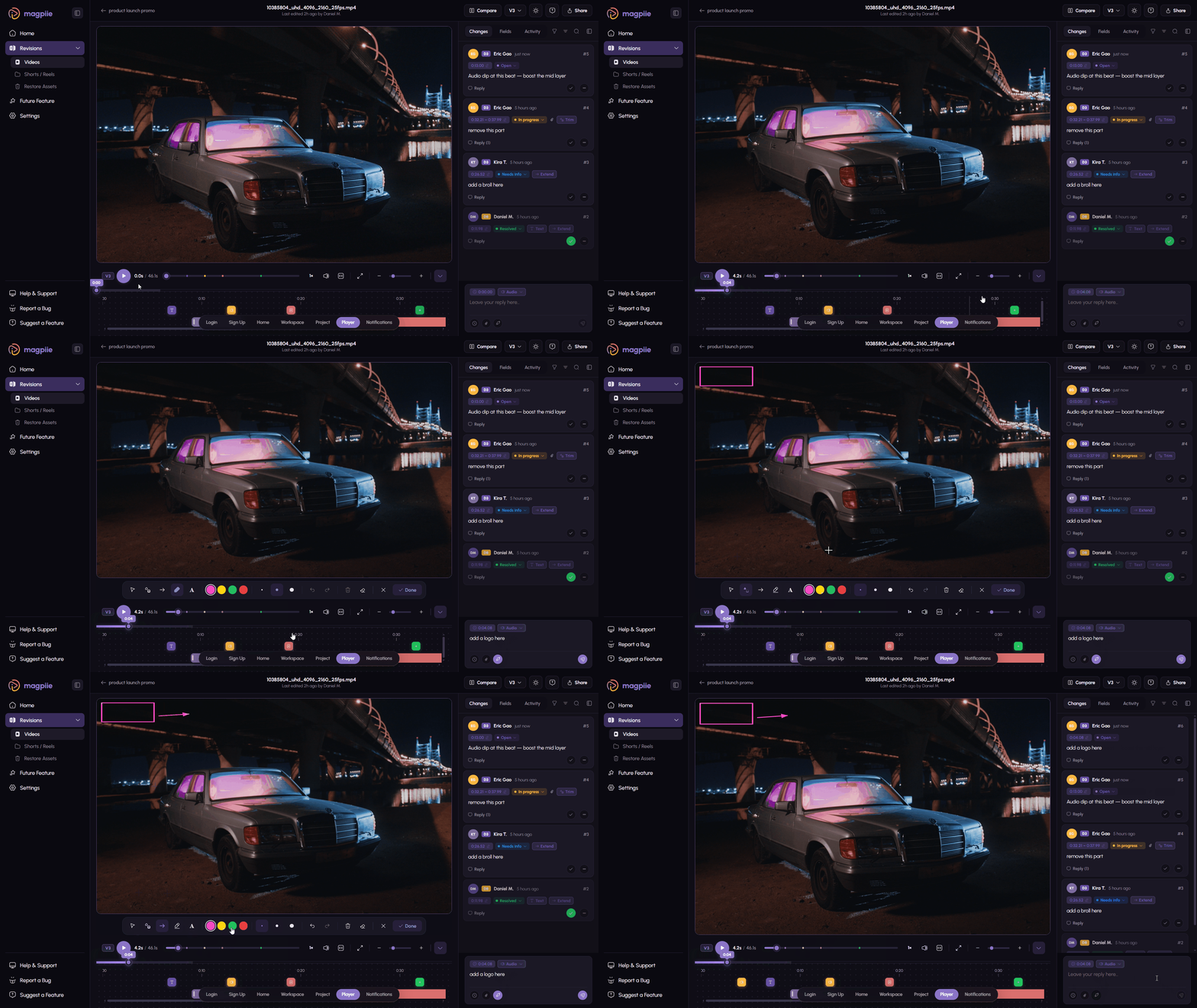
Stop digging through folders. Or guessing which is latest.
Every draft stays organized, visible, and easy to track. Drag a cut in and Magpiie does the bookkeeping — version, owner, timestamp, status, all of it.
- Upload drafts in seconds with drag-and-drop
- Auto-stack versions in chronological order
- Latest draft is obvious at a glance
- Replace files without losing existing comments
- Restore any previous draft, anytime
- Add release notes that travel with the version
- Tag reviewers directly when sharing
- Mark drafts as internal or client-ready
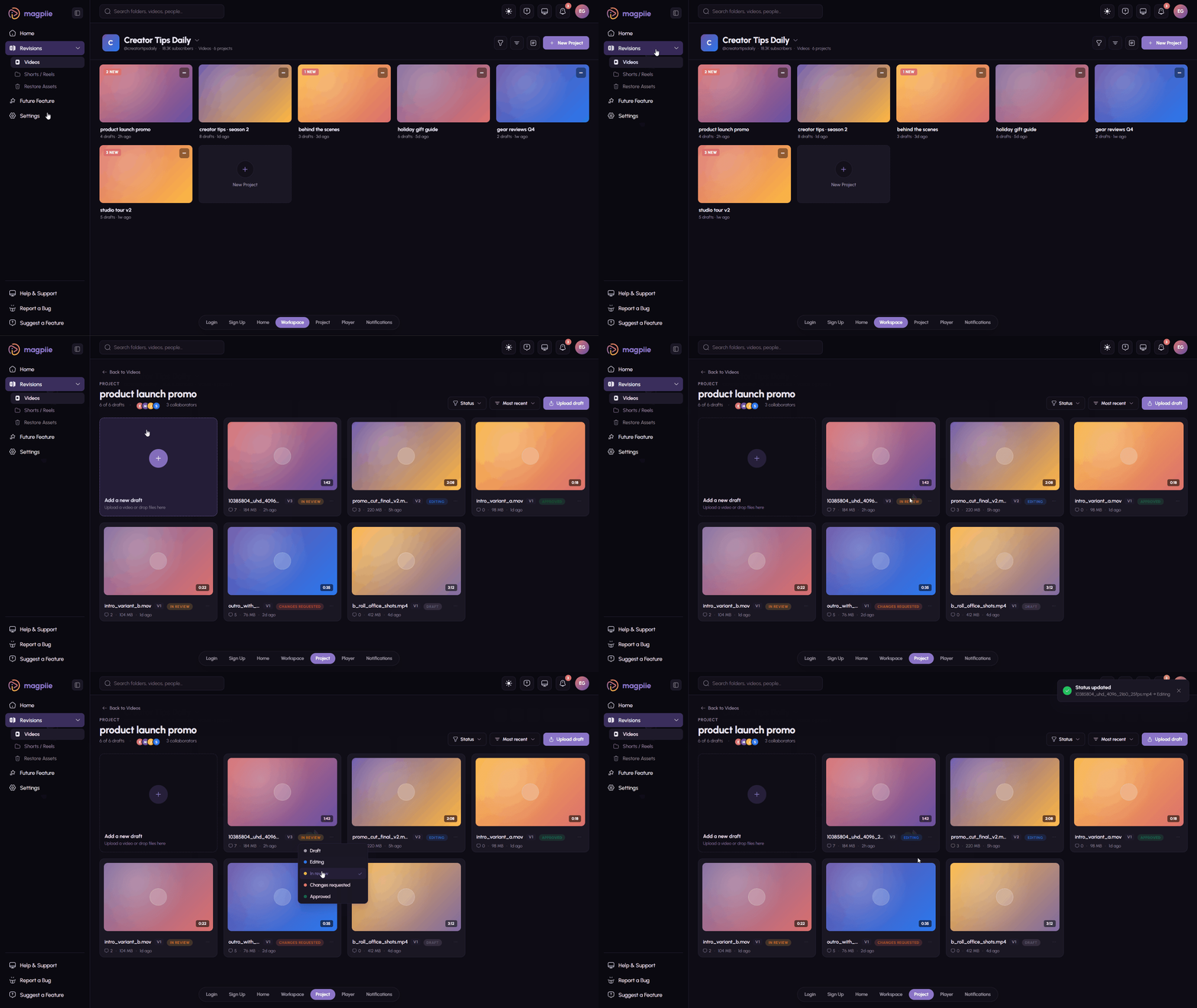
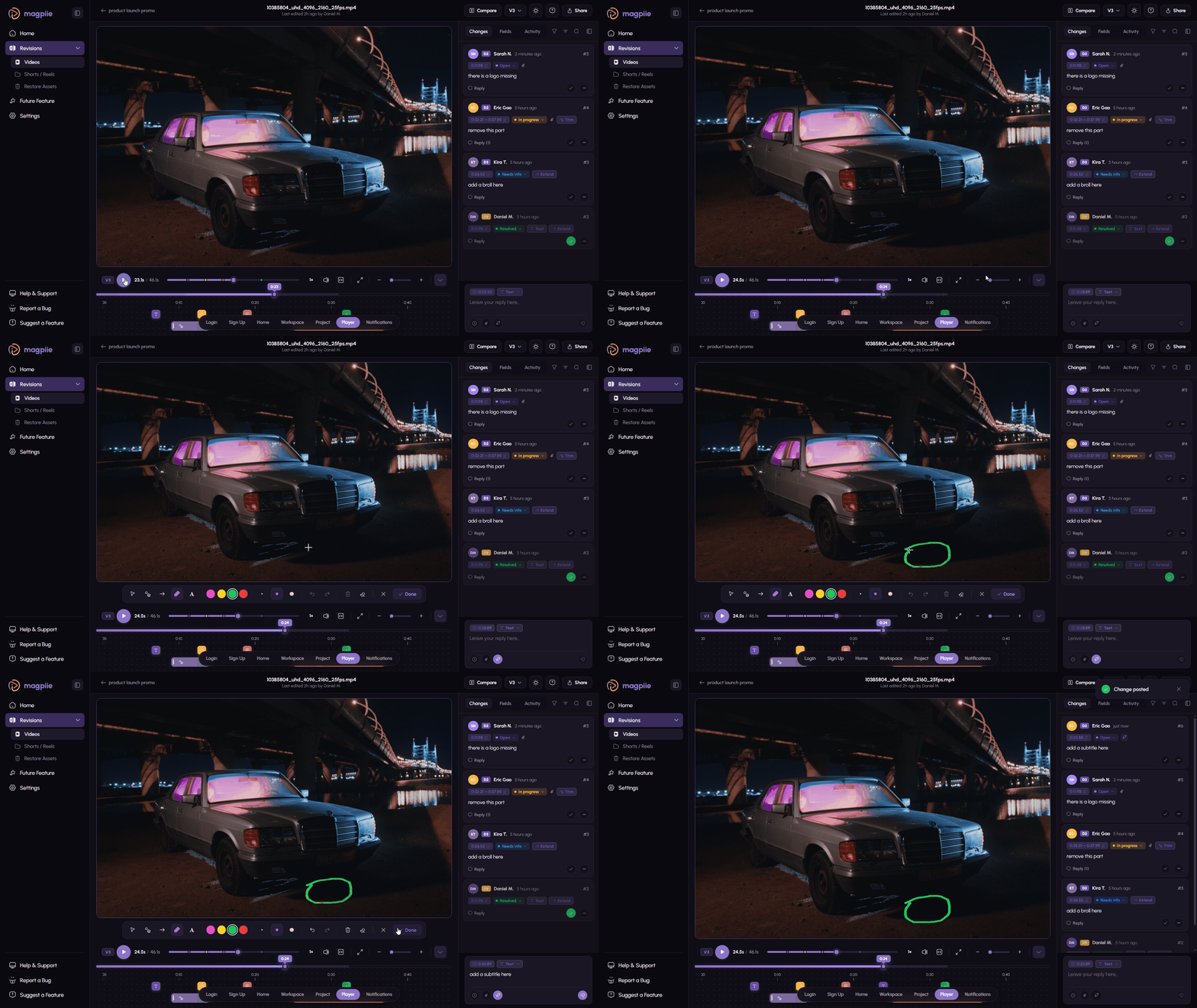
Vague becomes precise. Right on the frame.
The line you couldn't describe, the moment you couldn't timestamp — point at it instead. Editors get instructions they can execute, not interpretations they have to guess.
- Comment directly on specific video frames
- Jump instantly to the exact moment
- Thread replies that stay in context
- Assign comments to specific teammates
- Categorize: visual, audio, text, timing, graphics
- Mark Must Fix vs Suggestion so priority is clear
- Freehand draw on the frame to highlight the issue
- Track unresolved comments across the whole draft
- Note additions and trims as structured changes
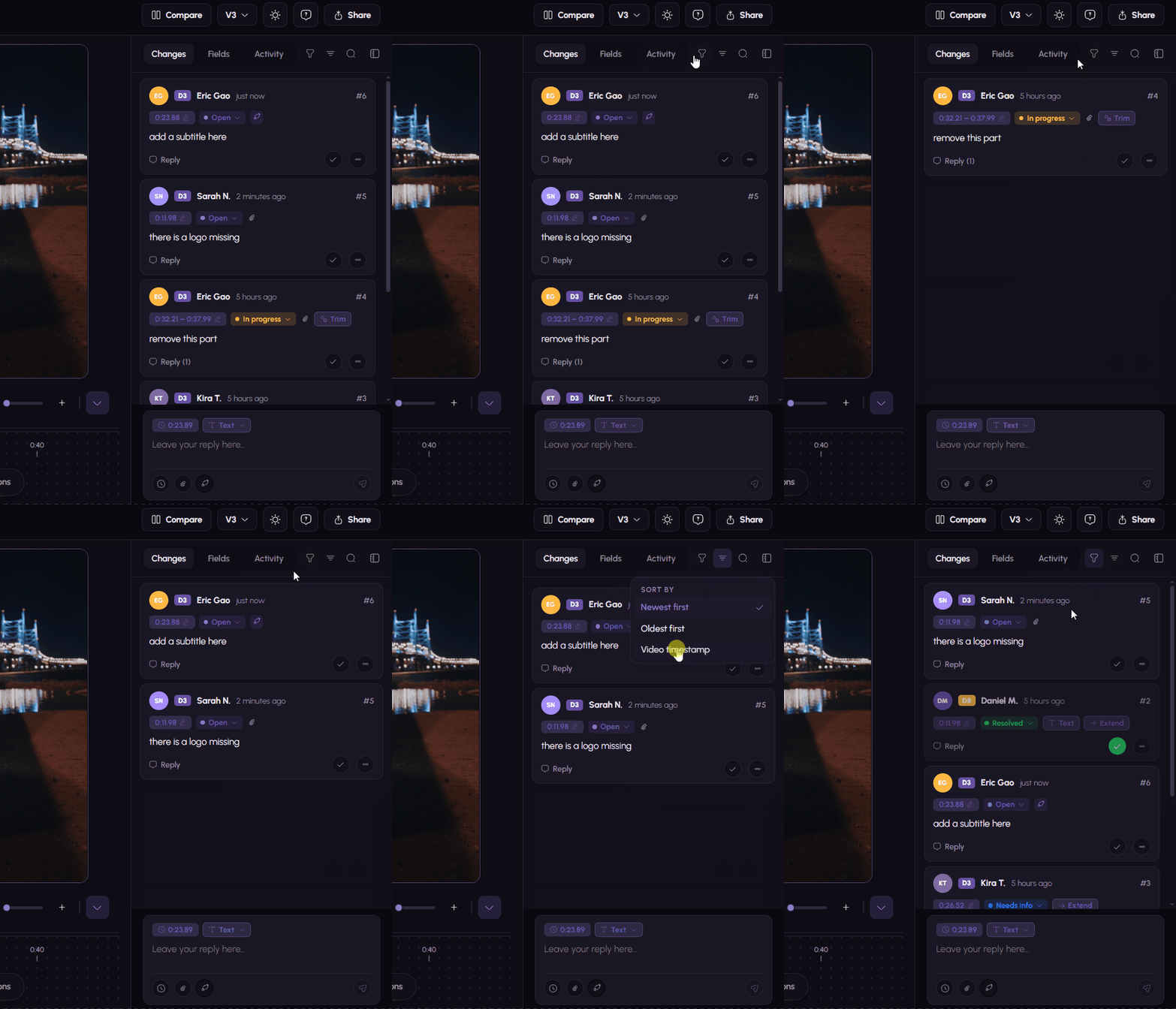
No more 'Did you fix this?' moments.
Every revision is documented, visible, and accountable. Rounds, resolutions, regressions — all tracked, no spreadsheets required.
- Auto-track revision rounds per project
- See how many comments were resolved each version
- Add revision summaries explaining the updates
- Reopen resolved comments if the fix did not land
- Highlight pending issues before the next review
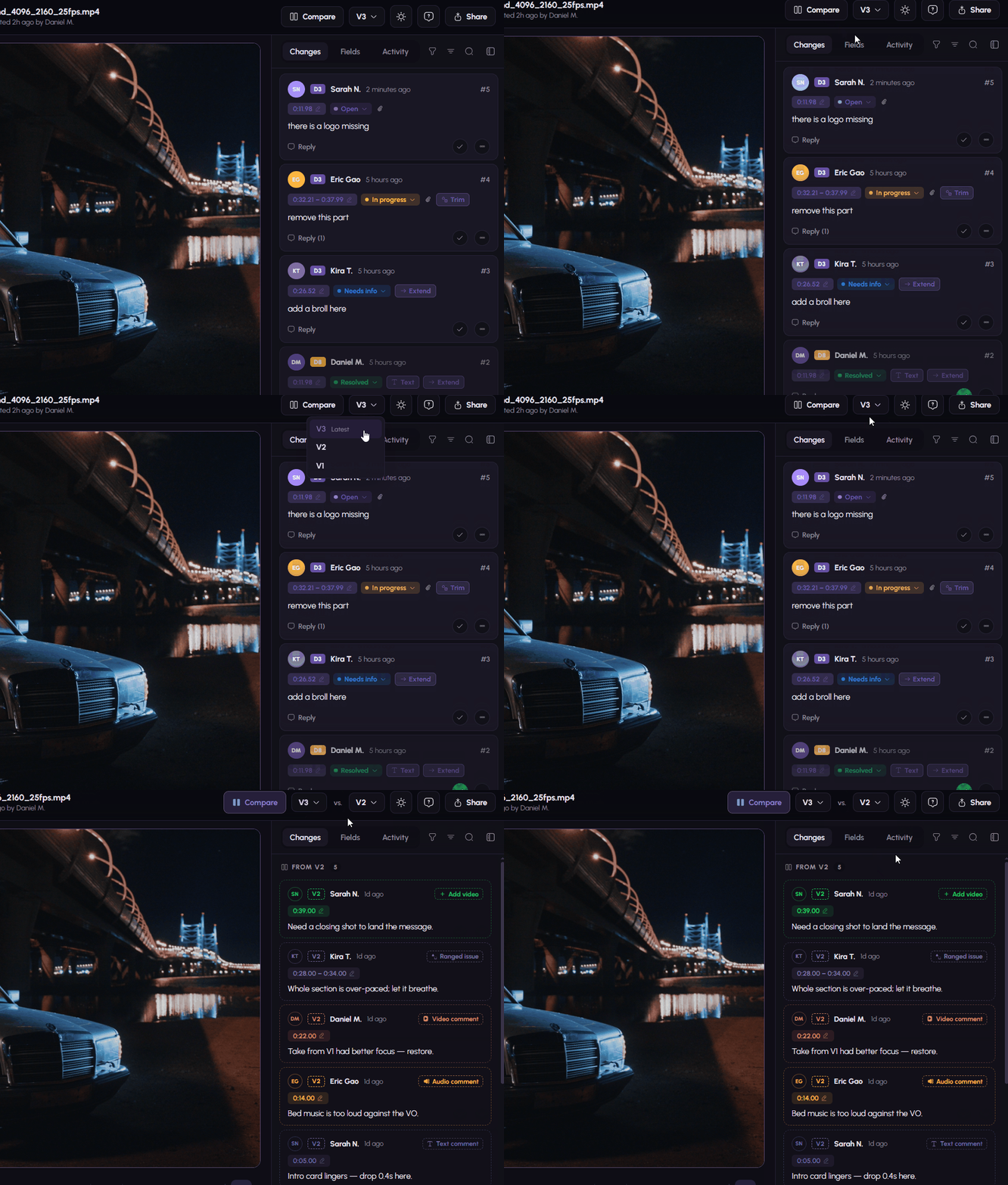
Old notes auto-follow the new cut. Verify in one pass.
Upload V4 and Magpiie syncs every prior frame-accurate note onto it. Reviewers can confirm, frame by frame, whether each note actually got fixed — without the manual cross-check loop.
- Old comments carry forward to the new draft
- Frame-accurate alignment, not approximate
- See resolved vs. still-open at a glance
- Pick any prior version to diff against
- Eliminates the round-over-round audit grind
Hesitation, gone. Readiness, visible.
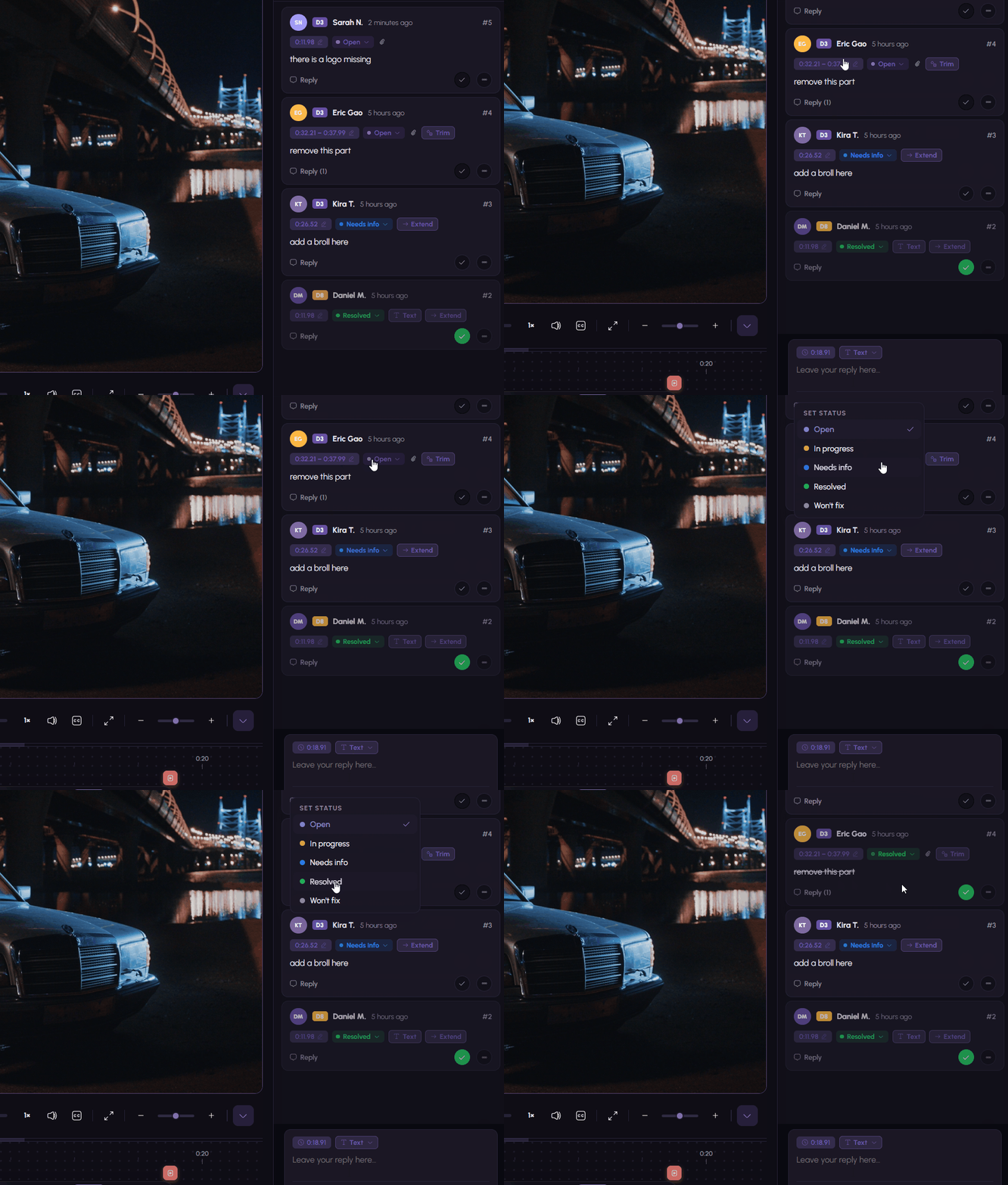
Magpiie surfaces exactly when a cut is ready to ship — and what's blocking it if it isn't. No more 'I think we're good?' Slack threads.
- Draft readiness indicators show approval-worthiness
- Confirmation that all critical feedback is resolved
- Suggestions surfaced separately from blockers
- Reviewers always pointed to the latest version
- Production manager approval = formal sign-off
The first review tool clients don't hate.
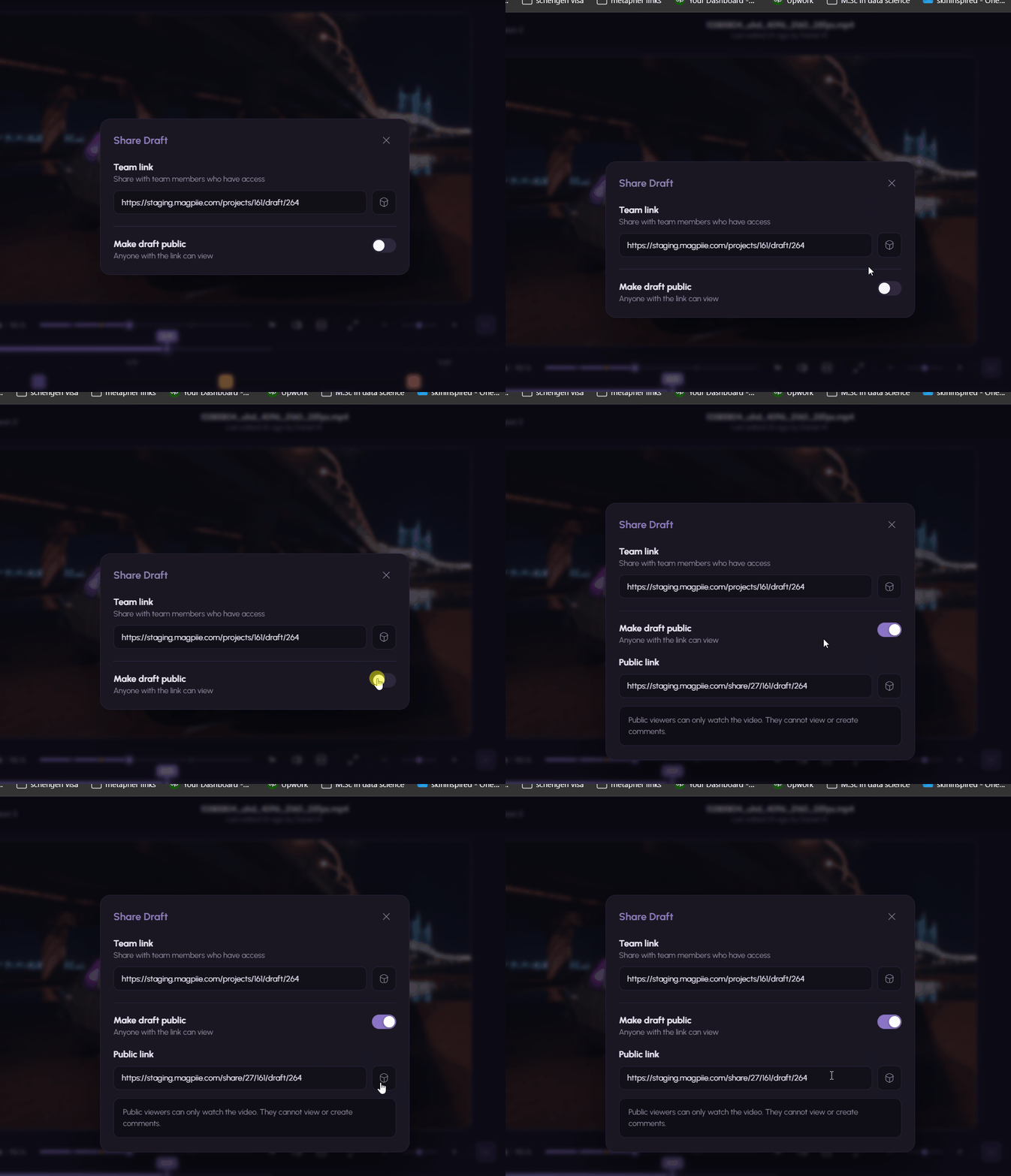
A client who has never seen Magpiie can give useful feedback in minutes. No signup. No download. No tutorial. Just the cut, the comment box, and a send button.
- Share a secure, private review link
- Clients comment without complex signup
- Internal team chats stay hidden from client view
- Clients are guided to the moments they commented on
- Distraction-free interface keeps focus on the content
Aligned. Without drowning in pings.
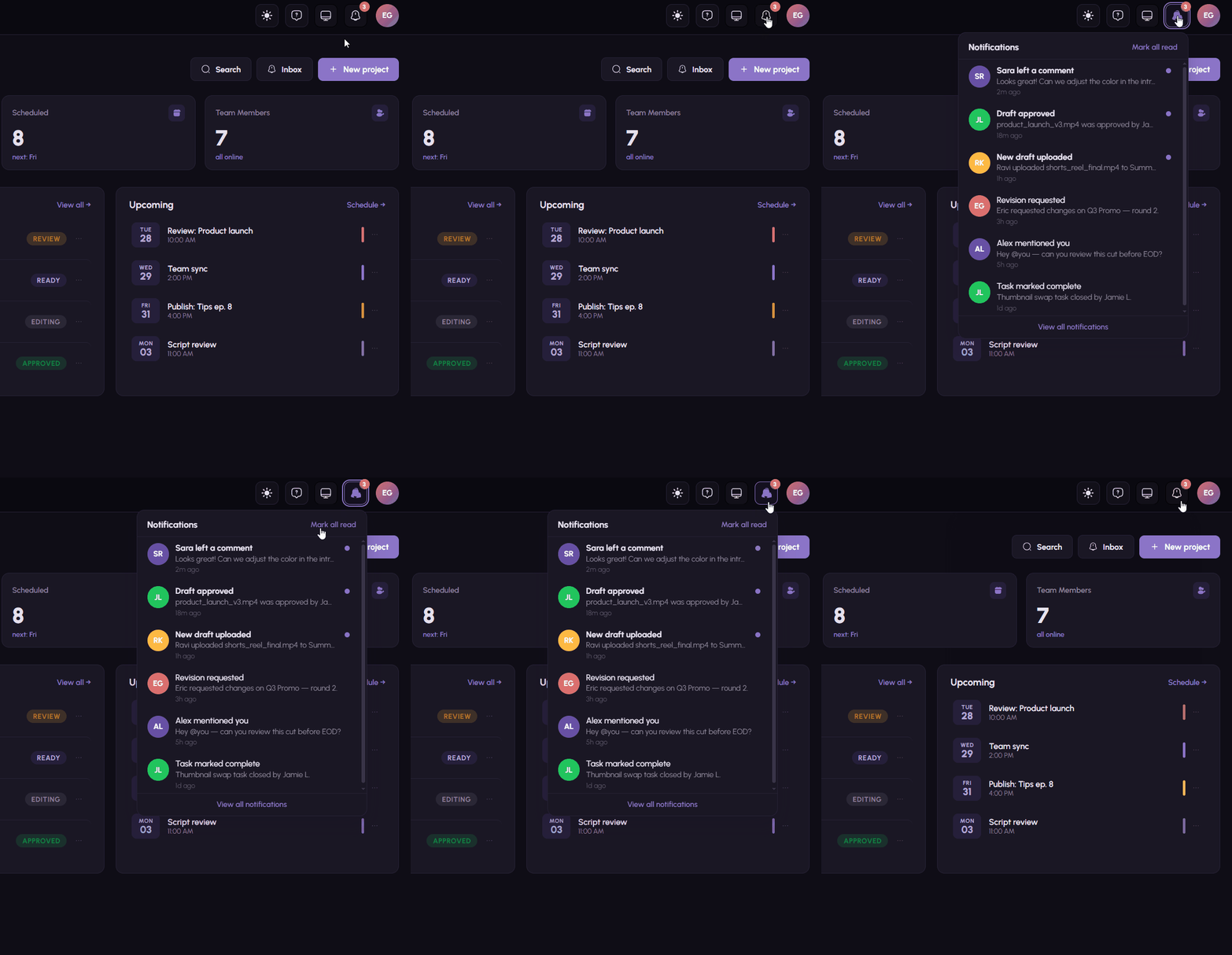
Editors hear about feedback the second it lands. Reviewers hear about new cuts. Everyone else can opt for the daily digest. You decide the volume.
- Editors notified the instant feedback arrives
- Reviewers alerted when a new revision is ready
- Gentle reminders surface pending reviews
- Per-user notification preferences
- Digest mode replaces constant pings
Every event timestamped. Every change attributable.
Know exactly what happened across every draft, without anyone keeping a side log. Magpiie writes the receipts as work happens.
- Track who requested each change
- See when each revision was uploaded and by whom
- Monitor comment activity per draft and per reviewer
- Maintain a clear, auditable review history
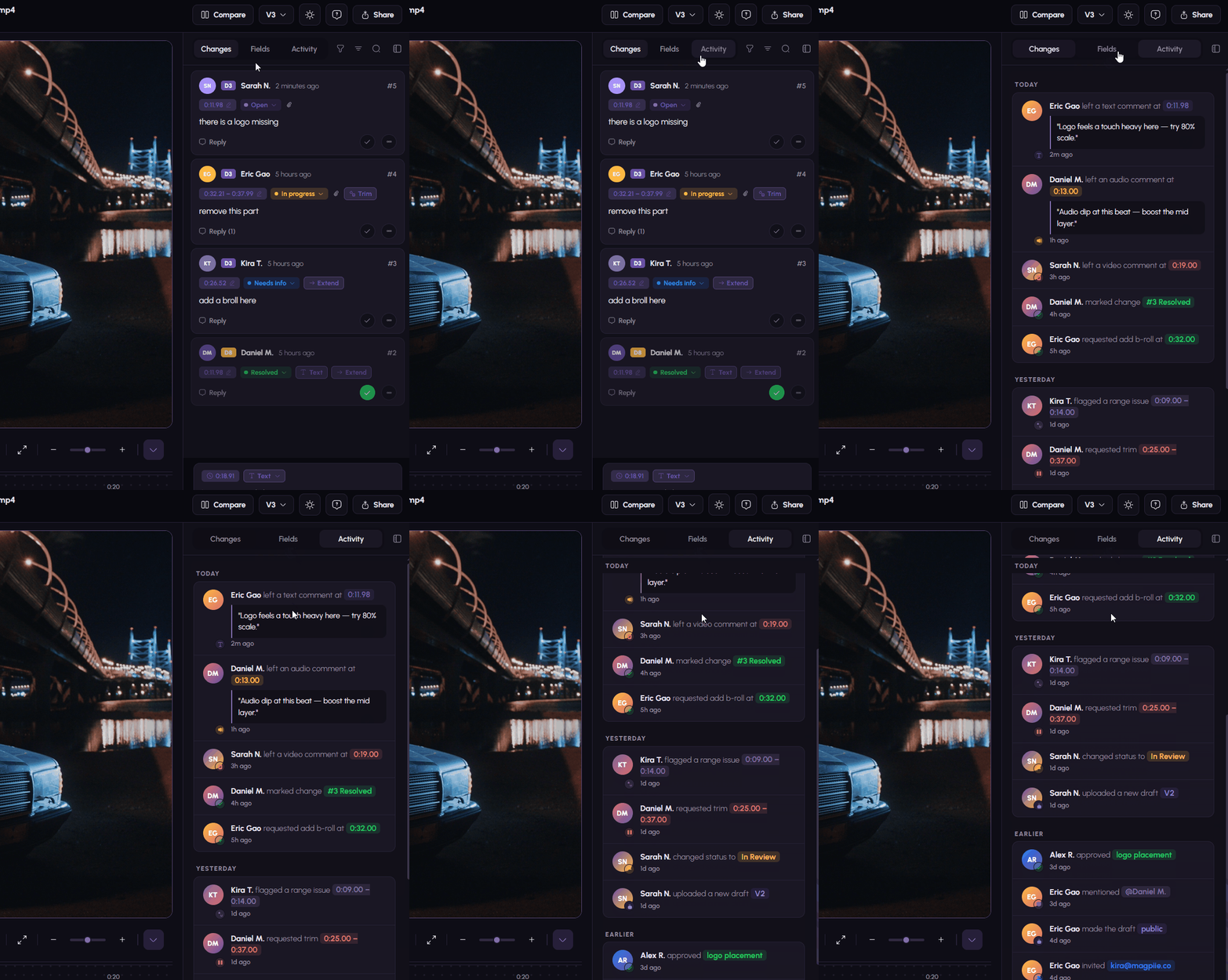
Fast tools ship fast cuts.
Slow review tools slow the entire production pipeline. Magpiie is engineered for the parts you do a thousand times — scrub, comment, jump, mark resolved.
- Smooth, responsive video playback
- Fast comment loading even on long cuts
- Quick navigation between feedback points
- Minimal clicks to take any action
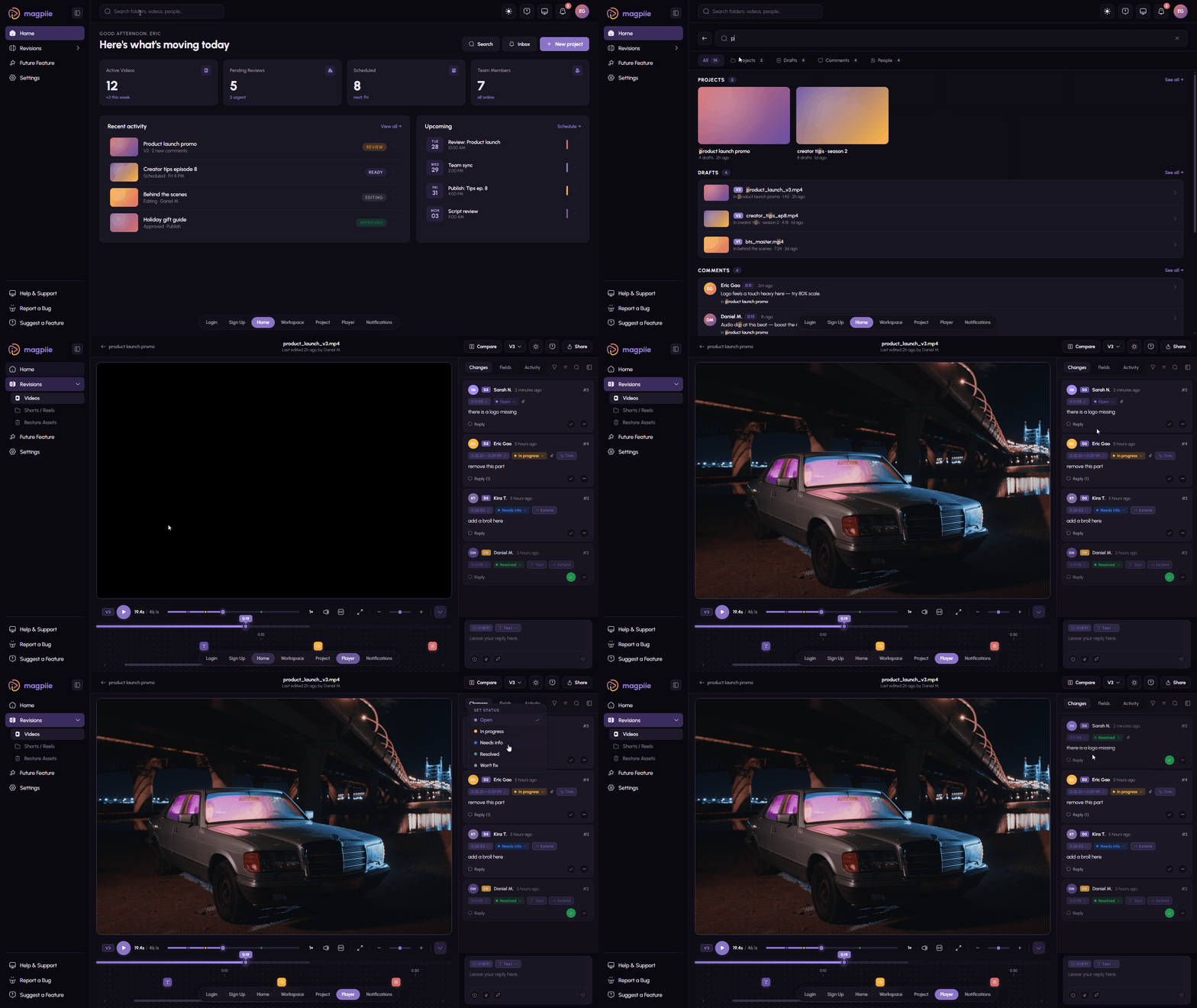
This isn't a render. It's the actual product.
A 60-second walk through the full happy path: drafts → frame-accurate review → compare → approve.
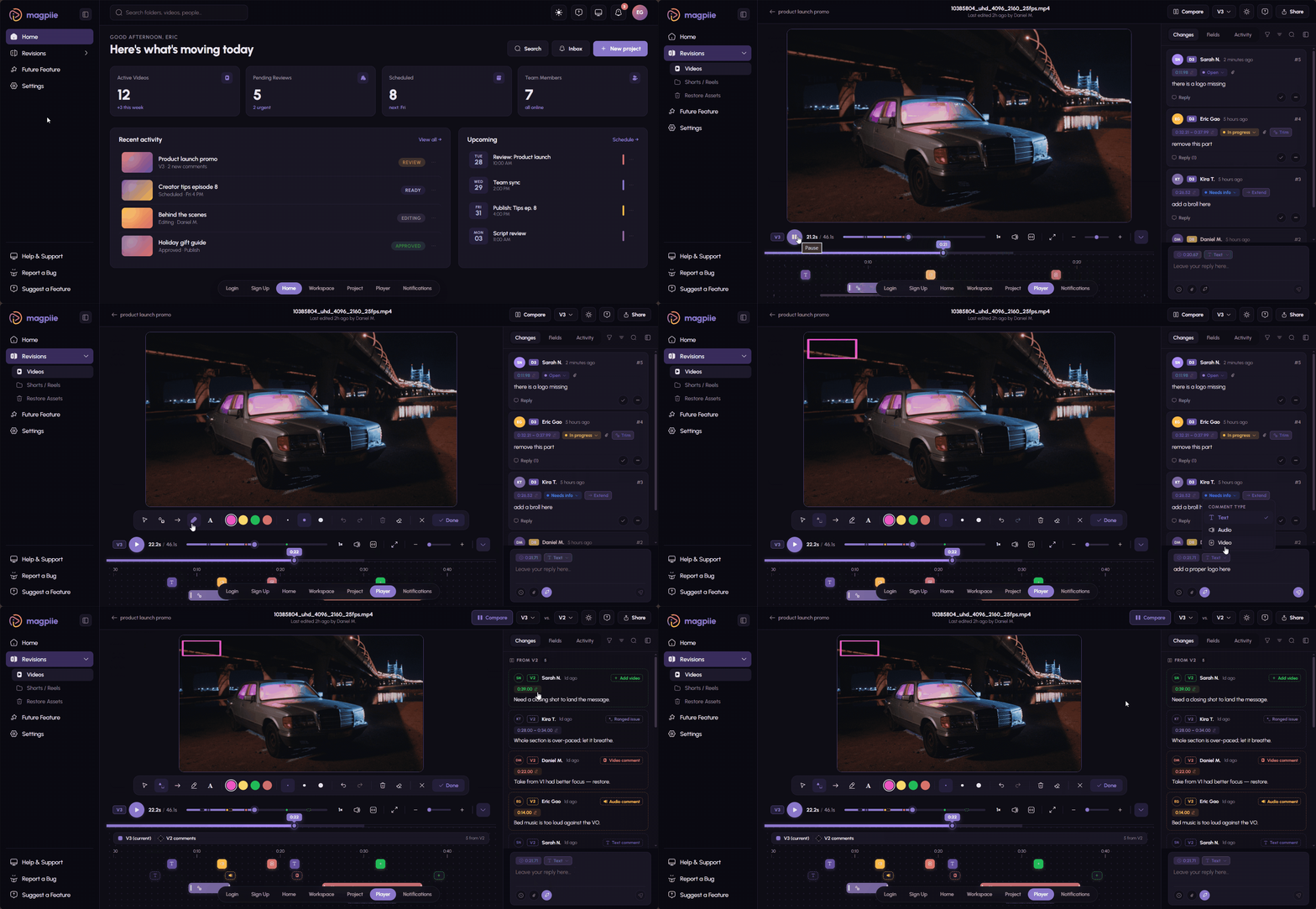
Six steps. Zero spreadsheets. One source of truth.
How a Magpiie review actually goes — from raw upload to signed-off, ready-to-publish cut.
Every step captured, timestamped, and attributable. No one keeps a side log.
Files live with the feedback. Not in another Drive.
Storage is native. Drafts, comments, revisions, and approvals belong to the same project — no juggling Dropbox links, no orphaned cuts. Tiered by team size and storage, so solo creators and full studios both pick what fits.
Quit the timestamp Doc. Ship the cut.
Frame-Accurate Revisions is live. Bring your team in five minutes — no sales call.
30 days on Creator Crew. Full team. Frame-accurate from minute one.
FAQ’s
Your Guide to Quick Solutions
Explore our comprehensive Help Center for easy access to troubleshooting tips, FAQs, and step-by-step guides.
While tools like Google Drive or WhatsApp can store files or send messages, they are not designed for structured video reviews. Feedback often gets scattered across chats, emails, and calls. Magpiie keeps drafts, comments, revisions, and approvals in one organized workflow so teams can review videos faster and avoid confusion.
Magpiie allows reviewers to leave timestamped comments directly on the video, so editors know exactly where a change is needed. Instead of searching through long messages or emails, editors can jump directly to the moment that needs fixing, which significantly reduces revision time.
Yes. Magpiie is designed for modern content workflows including YouTube videos, podcasts, social media content, ads, and courses. Whether you’re a solo creator or managing a full content team, Magpiie helps organize drafts and streamline feedback.
Absolutely. Multiple collaborators can watch the same draft and leave feedback simultaneously. Each comment is tracked with the reviewer’s name and timestamp, making it easy to manage feedback from editors, managers, and clients in one place.
When a new revision is uploaded, Magpiie automatically creates a new draft version while preserving all previous comments and feedback history. This helps teams track what changes were made and maintain a clear revision timeline.
No training is required. Magpiie is designed with a simple and intuitive interface, allowing clients to watch videos and leave feedback easily. They can click on a specific moment in the video to add a comment, making the review process effortless.
Get in touch
A real person on the team replies — usually within one business day.
Join the community
Share workflows, ask questions, and trade tips with editors and creators using Magpiie every day.
Avg. reply time: under 24 hours, Mon–Fri.
Talk to our team
Tell us a little about your workflow — we'll come back with a tailored answer, not a templated reply.